In today’s fast-paced eCommerce world, a seamless delivery tracking UI design plays a crucial role in enhancing user experience. This UI/UX design provides users with an intuitive and visually appealing way to track shipments and stay updated about their package status.
In this article, we will explore the various elements of this delivery tracking app UI, highlighting its clean aesthetics, functional features, and usability.
Overview of the Delivery Tracking UI Design
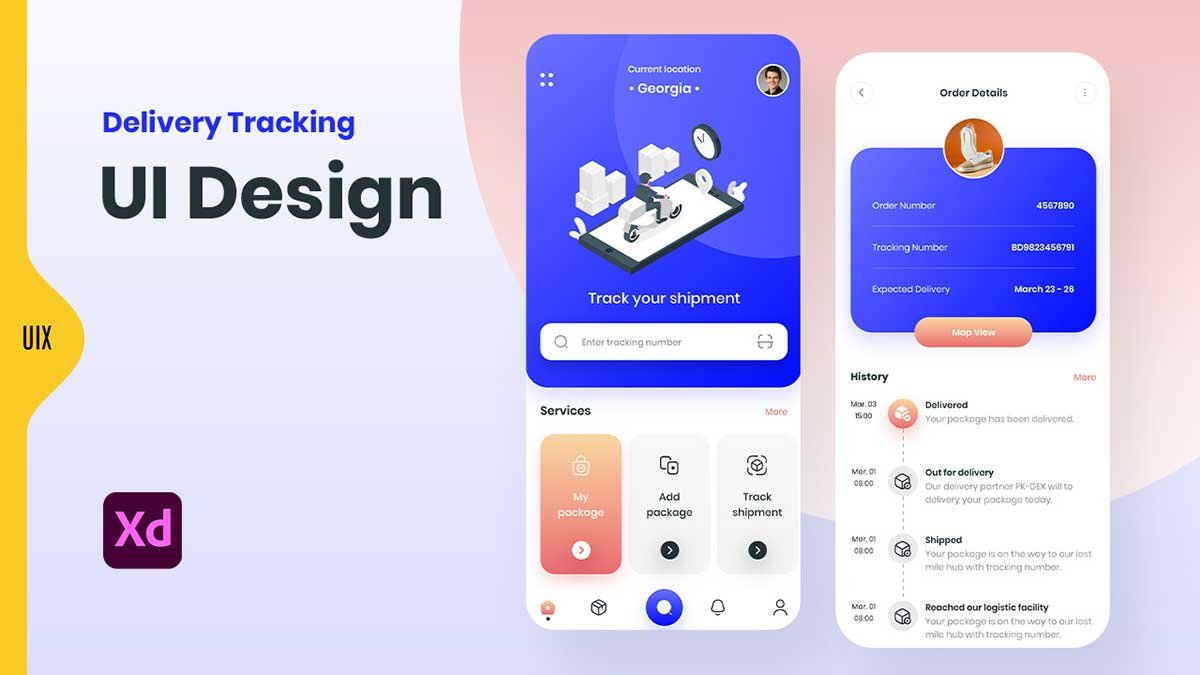
The design consists of two main mobile screens, each serving a distinct purpose:
- Home Screen (Tracking Input & Services)
- Order Details Screen (Shipment Status & History)
Each screen has been crafted with a modern, minimalistic style using a mix of gradient backgrounds, smooth typography, and engaging icons. Let’s break down the key UI elements in detail.
1. Home Screen – Shipment Tracking & Services
The home screen serves as the main interface where users can input their tracking number and access delivery-related services.
Key UI Elements:
- Top Section: Displays the current location (e.g., Georgia) and a profile picture, giving users a sense of personalization.
- Illustration: A visually engaging isometric illustration of a delivery process helps in branding and adds an interactive touch.
- Tracking Input Field: A simple, easy-to-use search bar allows users to enter their tracking number and retrieve package details.
- Services Section: Features three main options:
- My Package: View ongoing shipments.
- Add Package: Register new deliveries.
- Track Shipment: Access live package tracking.
- Bottom Navigation Bar: Includes icons for home, notifications, and profile settings, ensuring easy navigation.
This screen follows a gradient-based UI with soft rounded corners, making it visually appealing while maintaining clarity in information delivery.
2. Order Details Screen – Package Tracking & History
Once a user inputs their tracking number, they are taken to the order details screen, which provides real-time shipment updates.
Key UI Elements:
- Order Information Section:
- Displays Order Number, Tracking Number, and Expected Delivery Date, ensuring transparency for the user.
- Uses a rounded blue background card for emphasis, improving readability.
- Map View Button:
- A CTA (Call-to-Action) button allows users to view the package’s real-time location on a map.
- Delivery History Section:
- Displays the shipment timeline in a structured, easy-to-read format.
- Uses clear icons and time stamps to indicate package status (e.g., Delivered, Out for Delivery, Shipped, Logistic Facility).
This screen adopts a clean, organized layout with clear hierarchies, ensuring users can quickly grasp their package status.
UI/UX Best Practices Used in This Design
This delivery tracking UI design following the best UI/UX practices:
- Minimalist Design: Uses soft gradients, rounded corners, and ample white space for a clean look.
- User-Centered Navigation: The bottom navigation bar provides easy access to key sections.
- Clear Visual Hierarchy: Important details like tracking number and delivery status are highlighted.
- Engaging Illustrations: Custom isometric designs enhance user engagement.
- Responsive UI Elements: Buttons and text fields are designed for easy interaction on mobile screens.
Why a Well-Designed Delivery Tracking UI is Important
Having an effective shipment tracking UI design enhances user trust and engagement. Some of the key benefits include:
- Improved Customer Satisfaction: Users stay informed about their package location and estimated delivery time.
- Reduced Support Queries: A self-explanatory tracking interface reduces customer support requests.
- Enhanced Brand Perception: A well-designed UI builds credibility and professionalism.
- Delivery tracking UI design
- Shipment tracking UI for mobile
- Package tracking app UI design
- Modern delivery tracking user interface
- Best UX for shipment tracking apps
- Real-time order tracking mobile UI
This delivery tracking UI design is an excellent example of how modern UI/UX principles can enhance the logistics and shipment tracking experience. By incorporating clear navigation, engaging visuals, and structured delivery timelines, this UI ensures users can track their packages effortlessly. Whether you’re designing a shipment tracking app UI or improving an existing one, focusing on user experience is key to success.
To learn Figma, UI/UX design, web design, mobile app ui design, responsive design, no-code development, and AI-powered tools, and to download premium quality UI kits, Check out my YouTube channel (@uixDesignAcademy) for simple and easy beginner tutorials, also check our daily ui challenge.