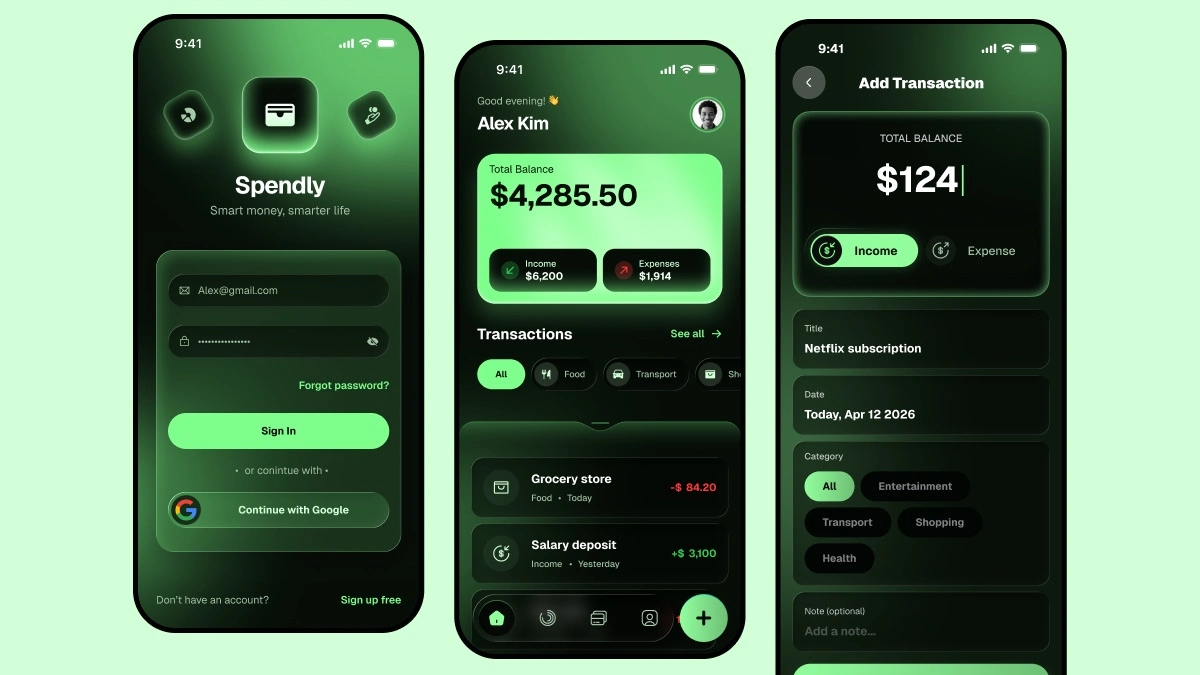
Looking for a Figma Finance App UI kit for a Finance and Expense Tracker App? Spendly is a fully designed dark UI mobile app built in Figma with real components, full Auto Layout, and 3 production ready screens. Download the figma source file and follow along with the full tutorial of UIX Design Academy.
What Is Spendly?
Spendly is a concept Finance and Expense Tracker App designed to help users monitor their income, track daily expenses, and manage their money in one clean, minimal interface. Dark UI, sharp typography, and a component-first structure make this a great reference for any fintech or personal finance project.
What’s Inside the Figma Finance App UI Kit?
3 Screens included in Figma Finance App UI Kit:
- Screen 1 — Login: Email, password, Google sign-in, clean dark layout
- Screen 2 — Dashboard: Total balance card, income vs expenses, transaction list with filter chips, bottom navigation
- Screen 3 — Add Transaction: Amount input, expense/income toggle, category chips, form fields, save button
Built with:
- Full Auto Layout on every screen
- Reusable components with variants
- Consistent 8pt spacing system
- Dark color palette — pure and intentional
- 375 x 812 — standard iPhone frame
Why This Figma UI Kit?
Most Claude AI generated Finance App designs look generic glowing gradients, emoji icons, inconsistent spacing. Spendly was redesigned from an AI concept into a premium dark UI in figma that actually looks like something worth paying for. Use this app UI template as a client project reference, a portfolio piece, or a starting point for your own fintech app.
Who Is This For?
- Designers — study real component structure and dark UI patterns
- Freelancers — use it as a client-ready reference or portfolio project
- Students — follow the YouTube tutorial and learn Auto Layout and components from scratch
- Founders — validate your fintech idea with polished, professional screens
If you are interested in more figma freebies, so see this onboarding account setup ui kit and personal finance tracker app figma ui design.