In today’s fast-paced digital world, a well-designed food delivery app UI/UX design plays a crucial role in enhancing user experience and increasing customer engagement. With the rise of online food ordering services, designing an intuitive and visually appealing food ordering app UI design is essential. In this article, we’ll explore the details of each screen in a mobile app UI design for food delivery, using Adobe XD food app UI kit for a modern and seamless experience.
Key Features of Food Delivery App UI/UX Design
Before diving into screen details, let’s highlight some key features that make a restaurant app UI design stand out:
- User-Friendly Navigation – Smooth and intuitive layout
- Attractive Visuals – High-quality images for engaging UI
- Easy Ordering Process – Minimal steps for a seamless experience
- Personalization – User profiles, saved addresses, and favorite orders
- Efficient Checkout & Payment – Secure transactions with multiple payment options
- Real-time Order Tracking – Keep users informed about delivery status
Food Delivery App Screens and UI Details
Now, let’s go through the best food app UI design by analyzing each screen in detail.
1. Splash Screen – First Impression Matters!
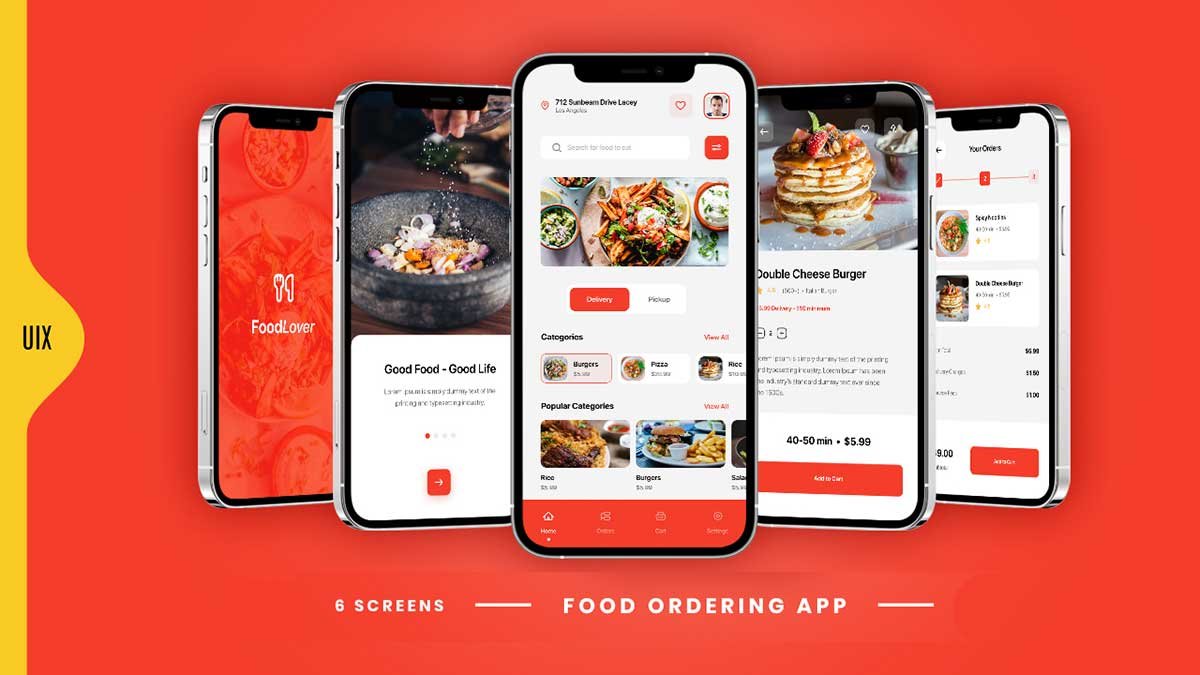
The splash screen is the first thing users see when they open the food lover app UI template. It includes:
- Brand Logo & Name – Strengthens brand identity
- Vibrant Background – Creates a welcoming feel
- Smooth Transition – Ensures a seamless app launch
A well-designed splash screen sets the tone for the app and improves user engagement.
2. Home Screen – The Heart of the App
The home screen is the central hub where users start exploring. It consists of:
- Search Bar – Allows users to find their favorite dishes quickly
- Delivery & Pickup Options – Flexibility for users
- Popular Categories Section – Displays different cuisines like Burgers, Pizza, Rice, and Salads
- Featured Restaurants & Meals – Encourages users to explore new dishes
- Navigation Bar – Includes Home, Orders, Profile, and Cart
This screen ensures a smooth restaurant app UI design experience by providing a structured layout and easy navigation.
3. Food Details Screen – Detailed Information
When users click on a meal, they are directed to the food details screen, which includes:
- High-Quality Food Image – Enhances visual appeal
- Food Name & Description – Provides important information
- Ratings & Reviews – Builds trust
- Delivery Time & Price – Helps in decision-making
- Add to Cart Button – Simplifies the ordering process
This screen follows best UI/UX practices for food delivery apps, making the user experience smooth and efficient.
4. Cart Screen – Order Summary
The cart screen is where users review their orders before checkout. It includes:
- List of Selected Items – Displays food name, image, and price
- Quantity Selector – Allows users to update order quantity
- Subtotal, Delivery Charges & Service Fees – Provides transparent pricing
- Checkout Button – Leads to the payment gateway
A clean and structured food ordering app UI design makes it easy for users to review and modify their orders.
5. Checkout Screen – Seamless Payment Process
A well-designed checkout screen is crucial for a smooth transaction. Key elements include:
- Billing Information – User’s saved address or option to add a new one
- Payment Options – Credit card, PayPal, or Cash on Delivery
- Order Summary – Ensures clarity before payment
- Place Order Button – Confirms the order
The best food app UI design ensures that the payment process is secure, quick, and hassle-free.
6. Profile Screen – Personalization for Users
A user profile screen allows personalization, making it an important part of mobile app UI design for food delivery. It includes:
- Profile Picture & Name – Enhances personalization
- Order History – Tracks previous purchases
- Saved Addresses – Saves time for frequent orders
- Settings & Logout Option – For managing account preferences
This restaurant app UI design screen improves user retention by providing customization options.
7. Notifications & Order Tracking Screen
Real-time order tracking is a must-have feature in a food delivery app UI/UX design. This screen includes:
- Live Order Updates – Shows order status in real-time
- Estimated Delivery Time – Keeps users informed
- Push Notifications – Alerts about order status, discounts, and promotions
This best UI/UX practice for food delivery apps improves user satisfaction by providing real-time updates.
How to Design a Food Ordering Mobile App in Adobe XD
If you are wondering how to design a food ordering mobile app in Adobe XD, follow these steps:
- Create a Wireframe – Plan the layout of each screen
- Choose a Color Palette – Use vibrant colors that enhance appetite
- Add High-Quality Images – Make the UI visually appealing
- Use Interactive Components – Buttons, icons, and transitions
- Test UI/UX Design – Ensure seamless navigation and usability
Using an Adobe XD food app UI kit can speed up the design process while maintaining consistency.
Why a Well-Designed UI/UX Matters for Food Apps
A well-structured food delivery app UI/UX design helps in:
- Increasing user engagement
- Improving customer retention
- Enhancing brand identity
- Boosting conversion rates
A successful food ordering app UI design ensures that users can browse, order, and checkout effortlessly.
To learn more about Figma UI/UX design Check out my YouTube channel (@uixDesignAcademy) for simple and easy beginner tutorials! and If you want to learn 100 days daily ui challenge here
A great food delivery app UI/UX design should be visually appealing, intuitive, and user-friendly. By incorporating the best mobile app UI design for food delivery practices, you can create an engaging experience for users. Whether you’re using an Adobe XD food app UI kit or designing from scratch, focusing on simplicity, usability, and aestheticswill make your app stand out.
With the increasing demand for online food ordering, a seamless Food Delivery App UI/UX Design can make all the difference in attracting and retaining customers. Start designing today and create an amazing food lover app UI template that users will love!