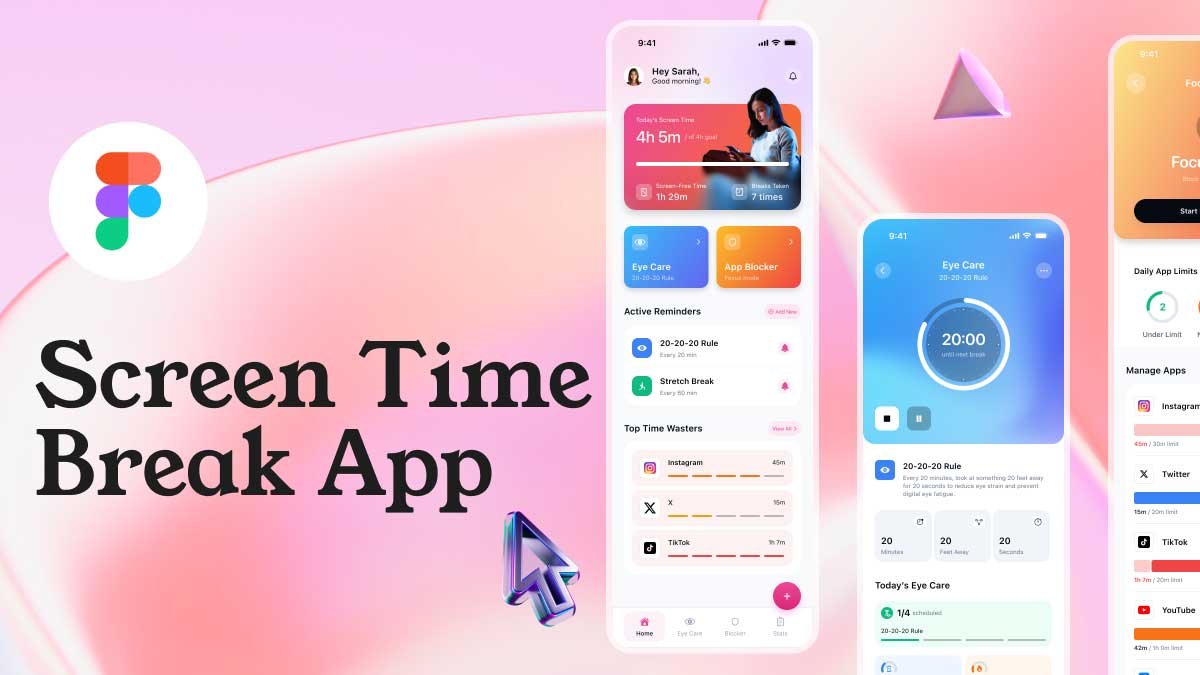
Design your own Screen Time Break App in Figma with this free UI kit! Perfect for beginners and anyone interested in digital detox and healthy screen habits.
What’s Included in the Free Screen Time Break App Figma File
This freebie includes 4 key screens to help you design a complete Screen Time Break App:
1 – Home Screen
A clean and intuitive Home Screen to display user stats and quick access features.
2 – Eye Care Screen
A screen focused on eye strain relief and digital wellness, helping users take breaks from their devices.
3 – Focus Mode Screen
A distraction-free Focus Mode UI to help users stay productive and reduce phone addiction.
4 – Stats Screen
Track screen time and app usage with a visually appealing Stats Screen.
Features of the Free Figma File
- Fully editable Figma screens
- Modern, minimal mobile UI design
- Perfect for Gen Z and beginners
- Includes all Home, Eye Care, Focus Mode, and Stats screens
Download this Screen Time Break App UI kit and start creating your own Figma designs today!
Boost your UI design skills with our Daily UI Challenge, where you can practice fun and easy exercises every day. For more beginner-friendly Figma tutorials, tips, and inspiration, don’t forget to explore our UIX Design Academy youtube channel and start designing like a pro!