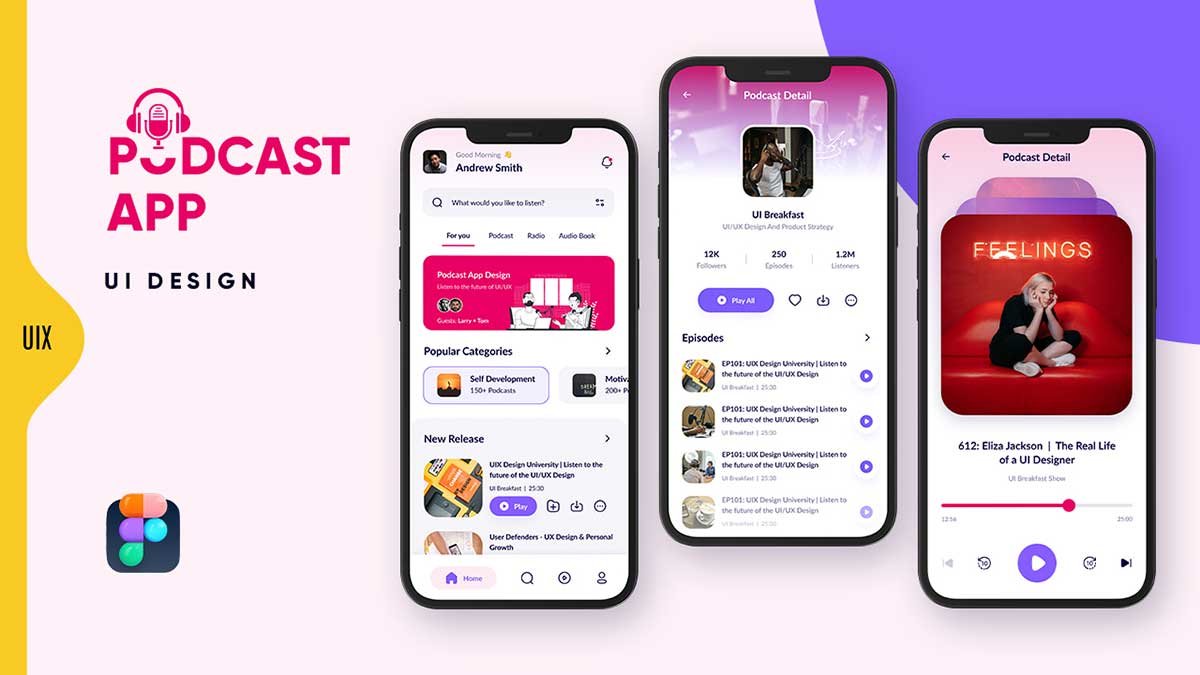
In the ever-growing world of digital audio content, a well-designed Podcast app UI design plays a crucial role in providing a seamless and engaging listening experience. Whether you’re a UI/UX designer or a developer, crafting an intuitive and visually appealing podcast app is essential. In this article, we’ll explore key elements of an effective podcast app UI, including screen details, functionality, and aesthetic design.
To learn Figma, UI/UX design, web design, mobile app ui design, responsive design, no-code development, and AI-powered tools, and to download premium quality UI kits, Check out my YouTube channel (@uixDesignAcademy) for simple and easy beginner tutorials!
Essential Features of a Podcast App UI Design
A great Podcast app UI design should be user-friendly, visually appealing, and efficient. It should prioritize ease of navigation, accessibility, and immersive listening. Below, we break down the three key pages that make up an ideal podcast app interface.
1. Home Page: Your Personalized Podcast Hub
The home page is the entry point of the podcast app, designed to make discovering and accessing content effortless.
Key UI Elements:
Welcome Header: Displays a personalized greeting with the user’s profile picture and name, along with a notification bell icon for alerts.
Search Bar with Filters: Allows users to search for podcasts with advanced filtering options to refine results.
Multiple Content Tabs: Organized sections for different content types:
For You (Default Selected): Highlights a featured podcast of the day, such as “Figma UI/UX Design.”
Podcast: Shows a variety of podcasts tailored to the user’s interests.
Radio: Displays live or recorded radio content.
Audio Books: Features popular audiobooks in various genres.
Popular Categories Section: Displays a horizontally scrolling list of trending podcast categories, such as:
Self Development (150+ podcasts)
Motivational (200+ podcasts)
Business Growth (100+ podcasts)
New Releases Section: A vertical list showcasing the latest podcast episodes with essential options:
Podcast thumbnail, Title, Play button, Add to favorites, Download option, More actions menu
Navigation Bar: Located at the bottom, featuring icons for:
Home, Search, Playlist, Profile
2. Podcast Details Page: Dive Into Podcast Content
Once users select a podcast, they are directed to the podcast details page, which provides in-depth information and interactive features.
Key UI Elements:
- Playlist Information:
- Playlist name and short introduction
- Album cover image
- Number of followers, total episodes, and total listeners
- Action Buttons:
- Play All button for continuous playback
- Heart (Favorite) button
- Download option for offline listening
- More options menu for additional settings
- Episodes Section:
- List of available episodes
- Play button for each episode
- Additional options (add to favorites, share, etc.)
3. Podcast Player Page: Immersive Listening Experience
A well-designed Podcast app UI design should provide an intuitive and aesthetically pleasing player screen to enhance user engagement.
Key UI Elements:
- Episode Information:
- Large episode artwork
- Episode name
- Playback Controls:
- Seek bar for adjusting progress
- Play/Pause button
- Previous and Next buttons for easy navigation
- Additional settings for speed control and sleep timer
Best Podcast App UI Free Download
If you’re looking for ready-to-use designs, several platforms offer best podcast app UI free download options. These UI kits provide high-quality pre-designed templates that you can customize and implement in your project.
Podcast App UI Kit: A Valuable Resource for Designers
A Podcast app UI kit includes essential UI components that help designers streamline their workflow. These kits often include:
- Pre-designed screens
- Customizable assets
- Icons and typography settings
- Light and dark mode variations
Using a UI kit can significantly speed up the design process and ensure consistency across the app.
Podcast App Design: Enhancing User Experience
A well-thought-out podcast app design should focus on minimalism, ease of use, and an intuitive interface. Here are some key principles:
Light Mode Interface: Clean, minimal, and attractive design with a premium aesthetic.
Typography and Colors: Use legible fonts and a soothing color palette to create a visually appealing experience.
Spacing and Layout: Maintain a well-structured layout with adequate padding and alignment for a clutter-free UI.
Popular Podcast App Inspirations
Several popular podcast apps provide excellent design inspiration. Some top-rated apps include:
- Spotify – Intuitive UI with an extensive podcast library
- Apple Podcasts – Clean and straightforward design
- Google Podcasts – Minimalistic and user-friendly interface
Summary
Creating an effective Podcast app UI design requires careful planning and attention to detail. By incorporating key design principles, leveraging UI kits, and drawing inspiration from popular podcast apps, you can craft a seamless and engaging experience for users. Whether you’re designing from scratch or using best podcast app UI free download options, focus on creating a visually appealing and functional interface to elevate the user experience.
Want to learn how to make responsive design in figma?