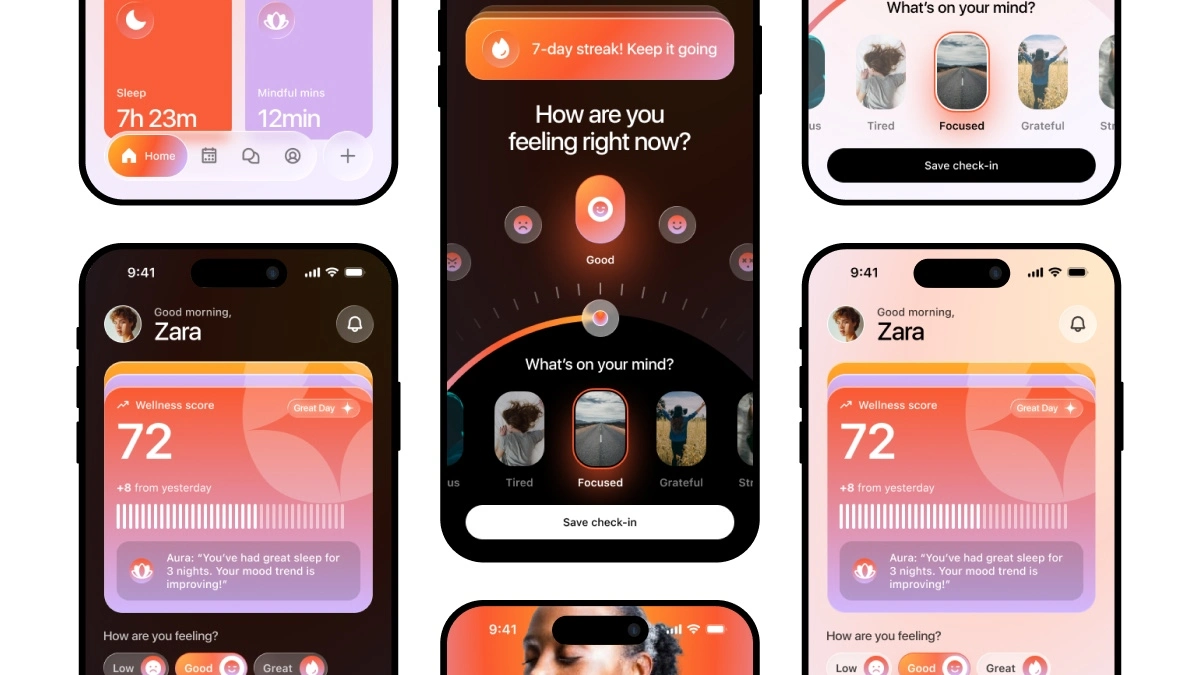
Looking for a Figma UI kit for a Ai wellness app or mental health app? Aura is a fully designed AI powered wellness companion mobile app built in Figma, complete with both light mode and dark mode screens, a global design system, 30+ screens, 100+ components, and everything you need to kickstart your next health app project. Whether you’re a UI/UX designer, developer, or product team, this ready-to-use Figma source file will save you hours of work, Get this complete Figma AI wellness app UI kit.
What is a AI Wellness App?
AI wellness app is a digital tool designed to help users monitor, improve, and maintain their overall physical and mental well-being. From mood tracking and guided meditation to sleep analysis and mindfulness exercises, wellness apps have become one of the fastest-growing categories in the mobile app market.
Aura is a concept AI wellness companion app that combines all of these features into a single, beautifully designed mobile experience. The app introduces users to an AI companion that learns from their daily habits, tracks their mood, monitors sleep quality, and delivers personalized insights — all wrapped in a clean, modern UI that works in both light and dark mode.
Who is This Figma UI Kit For?
The Complete Aura UI Kit was designed to serve a wide range of people from solo designers to full product teams:
UI/UX Designers
- Use it as a reference for modern mobile design patterns
- Study the layout, spacing, and component structure
- Customize it for your own client projects or portfolio
- Use the design system as a foundation for new wellness app concepts
Developers & Freelancers
- Use the screens as a pixel-perfect reference for front-end implementation
- Hand off the Figma file directly to your development team
- Save time by starting from a production-ready UI rather than a blank canvas
Startup Founders & Product Managers
- Use it to validate your wellness app idea before investing in development
- Present polished, professional screens to investors and stakeholders
- Test user flows and screen logic without a single line of code
Students & Design Learners
- Follow along with the full Figma tutorial on YouTube
- Add a professional-grade project to your design portfolio
- Learn how to structure a complete app from onboarding to core features
Content Creators & Design Educators
- Use it as a teaching resource for design courses and workshops
- Remix the UI kit for YouTube tutorials, blog posts, or course content
What’s Inside the AI Wellness App Figma Source File?
App Screens Included
- Screen 1 — Onboarding: Hero introduction to Aura, feature highlights, and dual CTAs
- Screen 2 — Home Dashboard: Wellness score, mood check widget, AI insights card, sleep stats, mindful minutes
- Screen 3 — Daily Mood Check-In: Emoji mood selector, mental state tags (Calm, Anxious, Focused, Tired, Grateful, Stressed, Motivated), optional note field, streak tracker
Design System Features
- Global style guide with typography, colors, and spacing rules
- 8-point grid system for consistent, scalable layouts
- Inter typeface — free Google Font, no licensing required
- Drag & drop components — fully detachable and editable
- Auto layouts on all major components for easy resizing
- Component stylesheet with variants and states
- 375 x 812 resolution — standard iPhone screen size
- Organized layer structure — easy to navigate and hand off
AI Wellness App Light Mode & Dark Mode
- The tutorial on YouTube walks through the complete light mode design
- The Figma source file includes both light mode AND dark mode — fully designed
- Dark mode uses a deep navy/purple palette with glassmorphic card surfaces
- Light mode uses a warm off-white canvas with vibrant accent colors
- Color tokens are structured to make switching between modes clean and consistent
This Figma UI kit for AI wellness app design comes with a complete, step-by-step video tutorial on the UIX Design Academy YouTube channel and boost your UI design skills with our Daily UI Challenge, where you can practice fun and easy exercises every day.